


How to Update Chevy MyLink Software
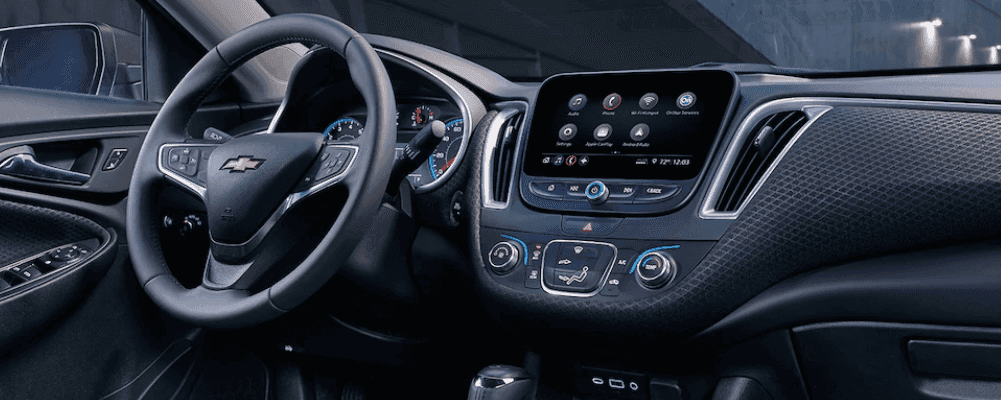 Chevy MyLink is a popular entertainment and connectivity system found on new Chevrolet models throughout the lineup. It is simple to update the Chevy MyLink software, but we have provided a guide below to help you with the process. Find out more about the benefits of Chevy MyLink and how to update it below!
Updating Chevy MyLink Software
Simply turn on the vehicle and the Chevy MyLink software should automatically perform any updates. While most Schaumburg Chevrolet drivers won’t have an issue, if you do run into problems, bring your vehicle into your local Chevy service center. We would be glad to take a look at your MyLink system and identify the issue.
Chevy MyLink Benefits
Chevrolet MyLink makes a great addition to your daily driving in Streamwood by providing entertainment and convenience features you won’t want to be without. Chevy MyLink works with both Apple CarPlay™ and Android Auto™ to allow app access from the in-car touchscreen. Along with phone integration, enjoy options like:
- Pandora®
- Turn-by-turn navigation
- Text message alerts
- Stitcher
- SiriusXM® Travel Link/NAV Traffic
- Available 4G LTE Wi-Fi® connection
- Siri® Eyes Free
Chevy MyLink: Teen Driver Features
Teach your kids to make good choices behind the wheel, even when you aren’t in the passenger seat. Chevrolet MyLink offers Hanover Park parents extra peace of mind with features like:
- An in-vehicle report card
- Audio muting when front passengers aren’t wearing their seatbelts
- Visual and audible warnings if the vehicle exceeds preset speeds
- Music volume limits
Explore Chevy MyLink at Biggers Chevrolet
Whether you are interested in finding a vehicle with MyLink or need help with your software, Biggers Chevrolet has everything that you need to get started. Browse our inventory for vehicles with innovative Chevy technologies, or feel free to bring your Chevy by our Elgin service center for assistance with your current software. If you have any questions, feel free to contact us today at your convenience!
More From Biggers Chevrolet
Trax, Trailblazer, or Equinox – Which Small Chevrolet SUV Fits Life near Bartlett, IL?
Biggers Chevrolet – Trax, Trailblazer, or Equinox – Which Small Chevrolet SUV Fits Life near Bartlett, IL? If you live near Bartlett, IL and want a new Chevrolet SUV that is easy to park, comfortable for daily driving, and flexible enough for errands, commutes, and weekend plans, three models usually rise to the top: Chevrolet…
Which Chevrolet SUV Size Is Right for You in Elgin, IL? Cargo, Seating, AWD, and Daily Driving Guide
Biggers Chevrolet – Which Chevrolet SUV Size Is Right for You in Elgin, IL? Cargo, Seating, AWD, and Daily Driving Guide Shopping for a new Chevrolet SUV in Elgin, IL often starts with a simple question: how much vehicle do you really need? Around Elgin, daily driving can mean a mix of downtown parking near…
Gas Chevrolet Equinox or Equinox EV – Which SUV Fits Your Drive near South Elgin, IL?
Biggers Chevrolet – Gas Chevrolet Equinox or Equinox EV – Which SUV Fits Your Drive near South Elgin, IL? If you live in or around South Elgin, IL, the choice between a gas Chevrolet Equinox and the all-electric Chevrolet Equinox EV is more practical than it might seem at first. Both are compact SUVs with…
0 comment(s) so far on How to Update Chevy MyLink Software